Quick OB · For industrial engineers and the sewing floor
Plan the line. Track every hour.
Quick OB helps garment factories build the operation bulletin, calculate SMV and see planned vs actual output as it happens.
What is Quick OB?
Quick OB is operation bulletin and production tracking software for garment factories. Industrial engineers build the OB and get SMV from digital time studies, line writers enter hourly output on any device, and supervisors and managers see planned vs actual output live, with a skill matrix for every operator.
The problem
Why production floors lose time and output
Most delays start with a plan nobody can check. These are the usual causes.
Operation bulletins on paper
Every new style means a new sheet drawn by hand. Repeat styles are planned from scratch.
SMV by guesswork
Time studies are done with a stopwatch and a notebook. Targets and costs rest on rough numbers.
Line writing on paper
Hourly output is written on a sheet and typed up later. Managers see yesterday, not now.
Hidden bottlenecks
One slow operation holds back the whole line, but nobody sees it until the day is lost.
No planned vs actual view
Plan and result live in different files, so delays are found after delivery dates move.
Skills nobody tracks
You cannot tell which operators are multi-skilled, so good people are wrongly placed.
How it works
Three simple steps
- 1
Plan
Build the operation bulletin and run time studies. SMV is calculated for you.
- 2
Enter
Line writers type hourly output on any device. It takes seconds.
- 3
See
Supervisors and managers watch planned vs actual live and act early.
Workflow
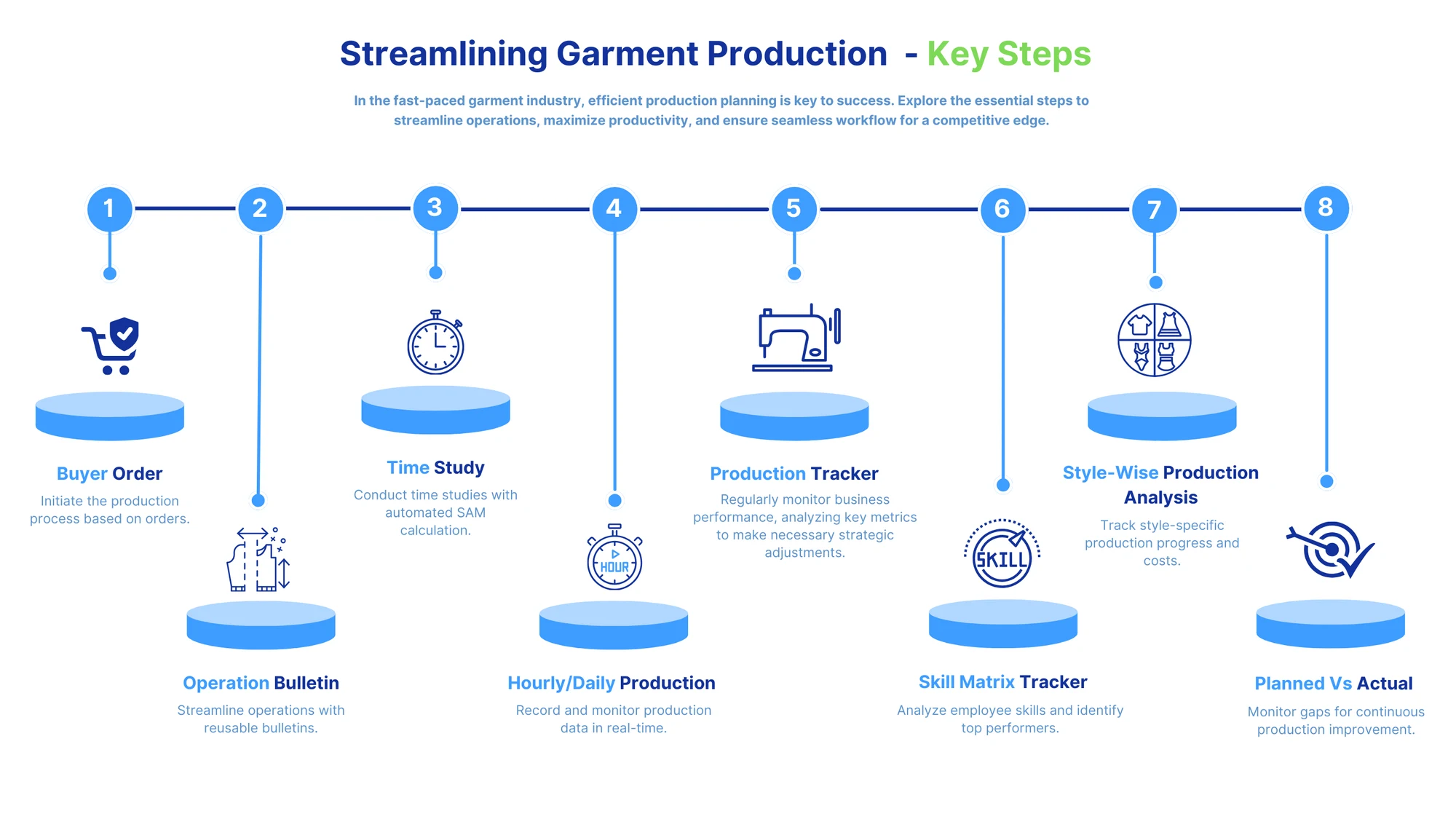
Eight steps from buyer order to planned vs actual
Every step feeds the next, so the plan you make is the plan you track.
Reports
One dashboard for the whole floor
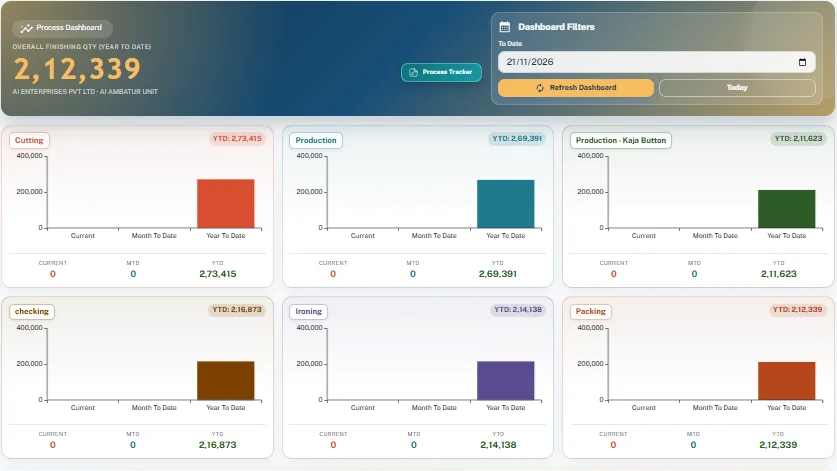
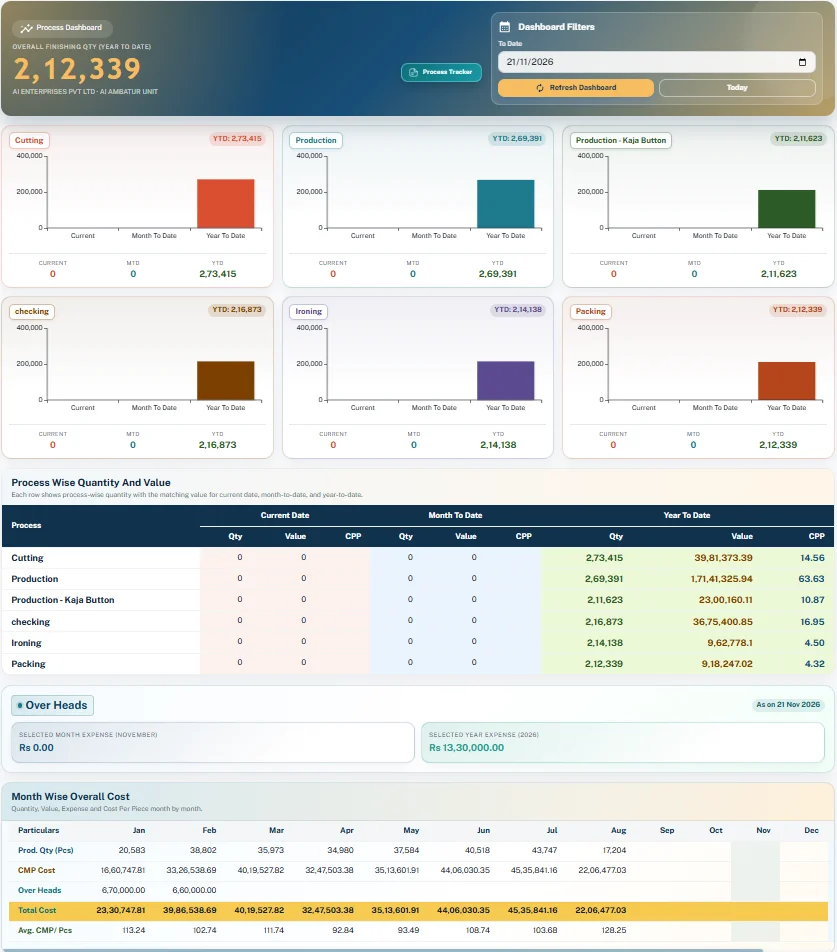
See quantity, value and cost per piece for every process, plus overheads and month-wise cost, on one screen.
Cost per piece by process and month
Cutting, production, checking, ironing and packing side by side, with current, month-to-date and year-to-date quantity, value and cost per piece, plus overheads and month-wise cost.
Pick any date and refresh
The same dashboard on an earlier date. Choose a date and see exactly where every process stood.
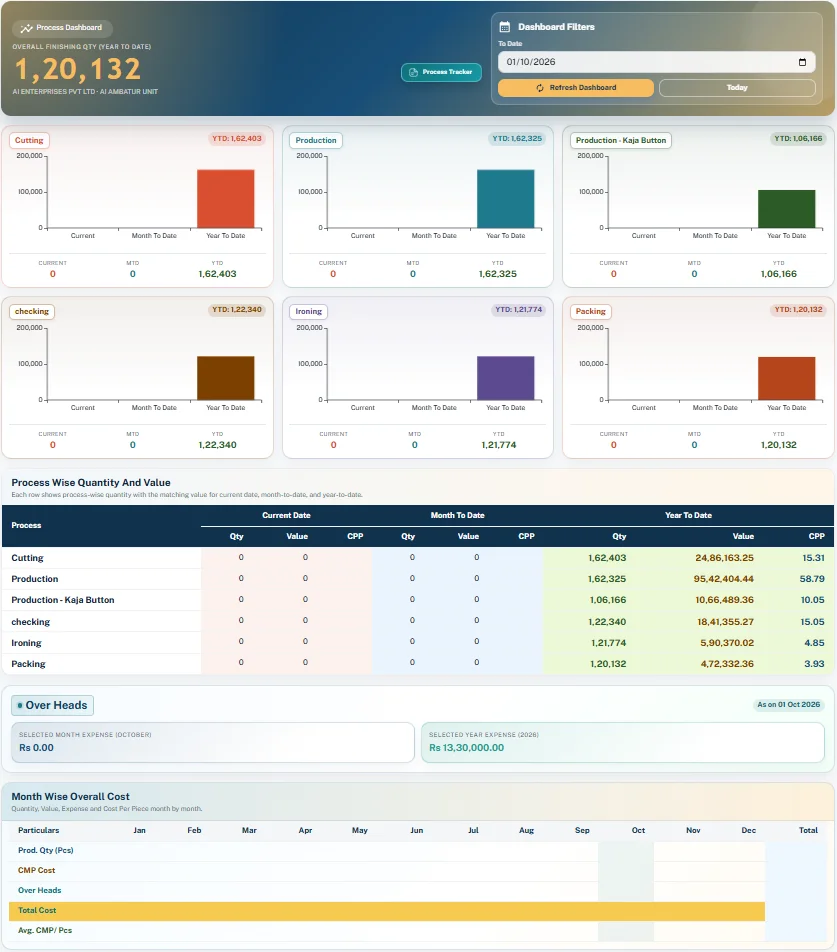
Screens show sample data.
Functional areas
What you get
Operation bulletin
Plan operations, machines and workers. Reuse it for repeat styles.
Time study and SMV
A digital stopwatch averages four runs to give standard allowed minutes.
Hourly and daily production
Enter output from a phone, tablet or desktop.
Production tracker
Compare planned and actual by line and spot delays.
Style-wise analysis
See progress, cost and timeline for each style.
Skill matrix tracker
Grade operators and find multi-skilled top performers.
For every role
Made for everyone on the floor
Industrial engineers
Faster OB, accurate SMV and reusable data.
Line writers
Simple mobile entry instead of paper sheets.
Supervisors
Live line status and hour-wise reports.
Management
Reports from anywhere, by unit, line and employee.
Before and after
Quick OB vs paper and stopwatch
What changes on the sewing floor.
| Task | Paper and stopwatch | Quick OB |
|---|---|---|
| Operation bulletin | Drawn by hand for every style | Built digitally and reused for repeat styles |
| SMV | Stopwatch and notebook | Digital time study averaging four runs |
| Hourly output | Written on a sheet, typed later | Entered on any device in seconds |
| Planned vs actual | In different files | Live by line, so delays show during the shift |
| Operator skills | Nobody tracks them | Skill matrix grades every operator |
Want to see Quick OB with your own data? Talk to a TARGET 360 specialist. 30 minutes, no obligation.
Book a free callSolutions
What teams use Quick OB for

Industries
Built for your part of the industry
FAQs
Frequently asked questions
Something else on your mind? Call +91 98408 99559 or write to sales@asktek.net.
What is an operation bulletin?
An operation bulletin (OB) lists every operation needed to sew a garment, in sequence, with the machine, the SMV and the number of operators for each. It is the plan a sewing line is balanced and tracked against.
How does Quick OB calculate SMV?
Engineers time each operation with the digital stopwatch in Quick OB. It averages four runs to give the standard allowed minutes (SMV), which then feed the operation bulletin, line targets and costs.
Can line writers enter data on a phone?
Yes. Line writers enter hourly output on a phone, tablet or desktop in seconds, and supervisors and managers see planned vs actual as it happens.
What is Quick OB?
A cloud-based operation bulletin application for garment manufacturers that simplifies SMV calculation, production planning and performance tracking.
Who uses Quick OB?
Industrial engineers, production line writers, supervisors and management, each with views made for their role.
Can Quick OB track production in real time?
Yes. Supervisors see targets against actual output hour by hour, so bottlenecks are fixed during the shift.
What results have factories seen?
At AI Enterprises, planning became 70% faster and line efficiency improved by 30% within 90 days.
Request a demo
See Quick OB on your own workflow
Tell us about your business and we will call you back to set up a demo.
Works well with
See Quick OB on your own style
Share one style and we will build its operation bulletin and tracker with you.